



ZigZag: Endless Wall-Balancing Precision
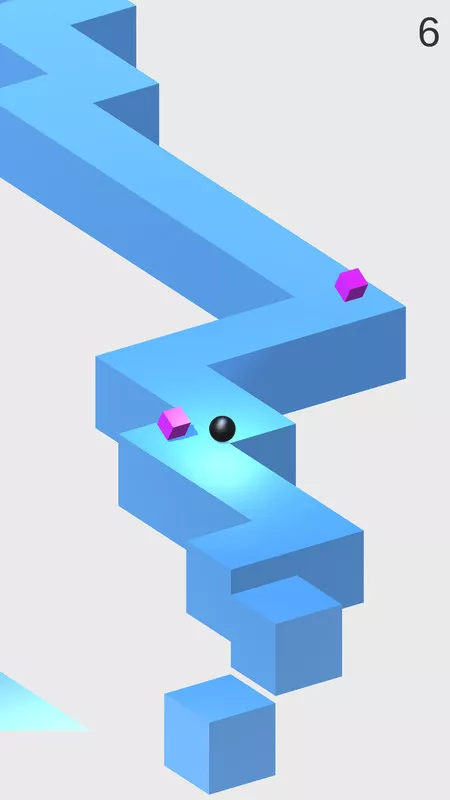
ZigZag is a minimalist, hyper-addictive reflex arcade game developed by Ketchapp. Controlling a sleek rolling sphere perched atop an endless floating isometric wall, players must navigate a maze of razor-sharp 90-degree corners.
The gameplay mechanics are completely distilled: tap the screen or press the spacebar to instantly toggle your ball's direction between left and right. The wall twists and turns unpredictably, demanding intense focus and rhythmic finger tapping.
Collect sparkling pink gems along the wall edge to unlock stylish new ball skins and color palettes, striving to set unbeatable high scores and climb personal best leaderboards.
How to play ZigZag
- Click the mouse, tap the screen, or press Spacebar to toggle the ball's roll direction 90 degrees.
- Time each directional tap to keep the ball centered on the narrow wall without rolling off into the abyss.
- Collect pink diamonds along the path to increase your score bonus and unlock cosmetic ball designs.
- Survive as many zigzag transitions as possible to set your personal high score record.
Tips for winning and high scores
- Find a steady tapping rhythm; rapid zigzags require quick double and triple taps in quick succession.
- Keep your eyes focused one or two turns ahead of the ball so you can prepare your tapping sequence.
- Don't risk falling off the wall for out-of-the-way diamonds—staying alive is always worth more points.
- Relax your hands and fingers: tension leads to late taps on sharp hairpin turns.
3D WebGL Rendering & Chromebook Performance
Zigzag relies on hardware-accelerated HTML5 and WebGL 3D graphics to keep high-speed obstacles and camera movement locked at a smooth 60 frames per second. Fast visual reaction time and spatial judgment matter at higher speeds, so the browser build is optimized to minimize input lag and RAM consumption on school Chromebooks, laptops, and classroom Wi-Fi connections.
Frequently asked questions
Is Zigzag free to play?
Yes, Zigzag is 100% free to play directly in your web browser on Blooket1 with no downloads, plugins, or sign-ups required.
Does Zigzag run well on school Chromebooks?
Yes! It uses hardware-accelerated HTML5 and WebGL rendering designed to run smoothly at 60 FPS on managed school Chromebooks, Windows laptops, MacBooks, and tablets.
Is my game progress saved automatically?
Yes, your high scores, unlocked levels, and settings are saved automatically in your browser's local storage so you can pick up right where you left off.
How do I play if my school blocks this page?
Click the Stealth mode button in the top navigation bar to disguise your browser tab as Google Docs, Google Drive, or Classroom, launch Zigzag inside an about:blank tab, or switch to one of our official alternate links like blooket1.pages.dev or educational.blooket1.com. You can also check our Guides & Tier Lists for more tips.