





Chrome Dino: The Legendary Offline T-Rex Runner
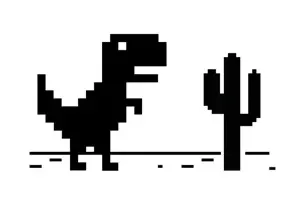
The Chrome Dino Game (also known as T-Rex Runner) is Google's world-famous browser Easter egg created by Sebastien Gabriel and Alan Bettes in 2014. Originally designed to entertain users during internet outages, it has become one of the most played casual games in history.
You control an intrepid 8-bit pixel T-Rex sprinting across an endless prehistoric desert landscape. Jump over clusters of spiky saguaro cacti and duck underneath low-flying pterodactyls as running speed steadily accelerates.
Survive long enough to watch the scene transition smoothly between daytime sunlight and inverted nighttime darkness. With instantaneous loading and responsive single-button controls, Dino Game is the ultimate pure arcade reflex test.
How to play Dino Game (T-Rex Runner)
- Press Spacebar or Up Arrow to jump over prickly cactus hazards.
- Press Down Arrow to duck underneath low-flying pterodactyls.
- Time your jumps carefully; jumping too early over cactus clusters will cause you to land on the trailing spines.
- Keep running as long as possible without clipping obstacles to achieve personal best high scores.
Tips for winning and high scores
- Use Down Arrow to fast-fall: pressing Down while airborne brings your dino down immediately, perfect for rapid jump recoveries.
- Don't jump for high pterodactyls; birds flying at head height or above can be safely walked or ducked under.
- Stay calm during the day-to-night color inversion at 700 points; the sudden contrast shift can momentarily distract your eyes.
- Focus your vision slightly ahead of the dino so you can anticipate whether upcoming obstacles require a jump or duck.
Chromebook Performance & Browser Architecture
Dino Game is built for modern web browsers using hardware-accelerated HTML5 Canvas and WebGL graphics. By streaming compressed assets and running inside an optimized browser sandbox, it keeps memory usage low and frame rates steady at 60 FPS on managed school Chromebooks, Windows laptops, and classroom Wi-Fi networks.
Frequently asked questions
Is Dino Game free to play?
Yes, Dino Game is 100% free to play directly in your web browser on Blooket1 with no downloads, plugins, or sign-ups required.
Does Dino Game run well on school Chromebooks?
Yes! It uses hardware-accelerated HTML5 and WebGL rendering designed to run smoothly at 60 FPS on managed school Chromebooks, Windows laptops, MacBooks, and tablets.
Is my game progress saved automatically?
Yes, your high scores, unlocked levels, and settings are saved automatically in your browser's local storage so you can pick up right where you left off.
How do I play if my school blocks this page?
Click the Stealth mode button in the top navigation bar to disguise your browser tab as Google Docs, Google Drive, or Classroom, launch Dino Game inside an about:blank tab, or switch to one of our official alternate links like blooket1.pages.dev or educational.blooket1.com. You can also check our Guides & Tier Lists for more tips.