





Doodle Jump: The Legendary Vertical Bouncing Classic
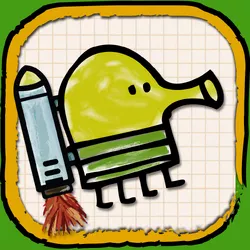
Doodle Jump is the immortal vertical platforming classic developed by Lima Sky that defined early mobile gaming. Guiding the adorable four-legged Doodler on a sheet of authentic graph paper, your objective is to leap endlessly upward from platform to platform.
Navigate tricky moving platforms, fragile breaking brown ledges, disappearing blue platforms, and springboards that launch you soaring into the upper atmosphere. Aim your nose snout to blast strange alien monsters with pellet balls or stomp them from above.
Strap on high-flying propeller hats, rocket jetpacks, and super-bouncy trampoline springs to bypass obstacles at supersonic speed while dodging lethal black holes and UFO abduction beams.
How to play Doodle Jump
- Use Left and Right Arrow keys or A and D to guide the Doodler horizontally across platforms.
- Aim your mouse cursor and click (or press Up Arrow) to shoot pellets from your snout at monsters.
- Bounce continuously on green, blue, and moving platforms to climb higher into the stratosphere.
- Screen-wrap: stepping off the left edge of the screen makes the Doodler emerge on the right edge.
Tips for winning and high scores
- Master the screen wrap: jumping off one edge of the screen to appear on the opposite side is essential for reaching distant platforms.
- Avoid brown cracked platforms; they break instantly upon touch and will send you falling to game over.
- Shoot monsters from below rather than trying to jump on their heads; hitting their hitboxes can be risky.
- Grab jetpacks and rocket packs whenever they appear—they make you completely invulnerable to monsters and black holes during flight.
Chromebook Performance & Browser Architecture
Doodle Jump is built for modern web browsers using hardware-accelerated HTML5 Canvas and WebGL graphics. By streaming compressed assets and running inside an optimized browser sandbox, it keeps memory usage low and frame rates steady at 60 FPS on managed school Chromebooks, Windows laptops, and classroom Wi-Fi networks.
Frequently asked questions
Is Doodle Jump free to play?
Yes, Doodle Jump is 100% free to play directly in your web browser on Blooket1 with no downloads, plugins, or sign-ups required.
Does Doodle Jump run well on school Chromebooks?
Yes! It uses hardware-accelerated HTML5 and WebGL rendering designed to run smoothly at 60 FPS on managed school Chromebooks, Windows laptops, MacBooks, and tablets.
Is my game progress saved automatically?
Yes, your high scores, unlocked levels, and settings are saved automatically in your browser's local storage so you can pick up right where you left off.
How do I play if my school blocks this page?
Click the Stealth mode button in the top navigation bar to disguise your browser tab as Google Docs, Google Drive, or Classroom, launch Doodle Jump inside an about:blank tab, or switch to one of our official alternate links like blooket1.pages.dev or educational.blooket1.com. You can also check our Guides & Tier Lists for more tips.